


- Status
- Offline
- Joined
- Apr 19, 2022
- Messages
- 143
- Reaction score
- 2
Mason for Counter-Strike 2 — Affordable Professional Aimbot & ESP
Counter-Strike 2 — Mason is an affordable professional cheat with a standard, well-rounded feature set: Aim Assist, Hit Assist (Trigger), full visualisation, clipboard-based configs and a custom radar with crosshair.
Mason is built for players who want a clean working toolkit at one of the lowest price points on the market. The Aim Assist module is per-weapon — pick the body part, smoothness, radius and precision, enable recoil compensation with RCS threshold, limit the aimbot to spotted enemies and enable automatic target switch on kill. The Hit Assist module adds a Trigger Bot with its own hotkey, trigger delay and team-ignore toggle.
The Visualisation tab covers 2D boxes, skeleton, snaplines, player health, weapons, equipment, nicknames and distance, plus a planted-C4 indicator with explosion timer and ignore-team / ignore-spotted filters. The GUI block includes a custom crosshair, a draggable radar with size and radius sliders, and a two-language menu (English / Chinese). Configs are transferred through the clipboard — easy to save, easy to load.
Video
Prices
Pick the subscription that fits your schedule. Payment is processed instantly — access is activated right after checkout.| Period | Price | Checkout |
| 24 hours | $1 |
You cant view this link please login.
|
| 3 days | $2 |
You cant view this link please login.
|
| 7 days | $3 |
You cant view this link please login.
|
| 30 days | $5 |
You cant view this link please login.
|
System Requirements
- Game version: Steam
- Game mode: Windowed / Fullscreen in window / Fullscreen
- Operating system: Windows 10 / 11 x64, versions 2004 / 20H2 / 21H1 / 21H2 / 22H2 / 23H2
- Supported anti-cheats: Valve Anti-Cheat
- Processor: Intel and AMD
- Invisibility on videos / screenshots: no
Key Features
Below is a short overview of Mason's main modules. The full list with every toggle and slider is available in the expanded block further down.✔ Aim Assist — per-weapon settings, Aim spot, Smooth, Radius, Precision, Recoil comp + RCS threshold, Spotted only, Auto switch, Trigger delay
✔ Hit Assist — Trigger Bot with key binding and team-ignore
✔ Visualisation — Box, Skeleton, Snaplines, Health, Weapon, Name, Equipment, C4 timer, Distance, Ignore team / spotted
✔ Configuration — Save CPU, Load / Save config via clipboard
✔ GUI — EN / CN menu, Custom crosshair, draggable Radar with size & radius sliders
Full Feature List
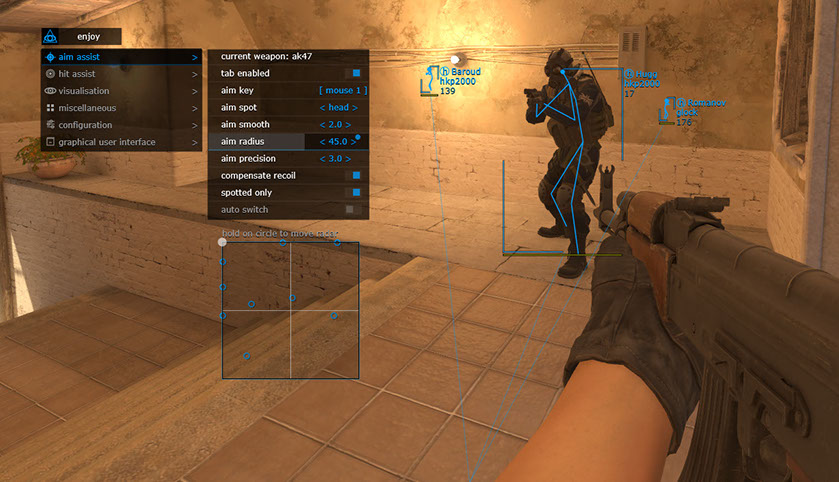
Aim Assist
- Current weapon — settings for the selected weapon
- Tab enable — activate aimbot
- Aim key — hold-to-activate key binding
- Aim spot — body part for the aimbot
- Aim smooth — aiming smoothness
- Aim radius — working radius
- Aim precision — aiming accuracy
- Compensate recoil — recoil compensation while aimbot is active
- Spotted only — only works on enemies visible on the radar
- Auto switch — automatic target switch on kill
- RCS threshold — level of recoil compensation
- Trigger delay — delay before triggerbot activates
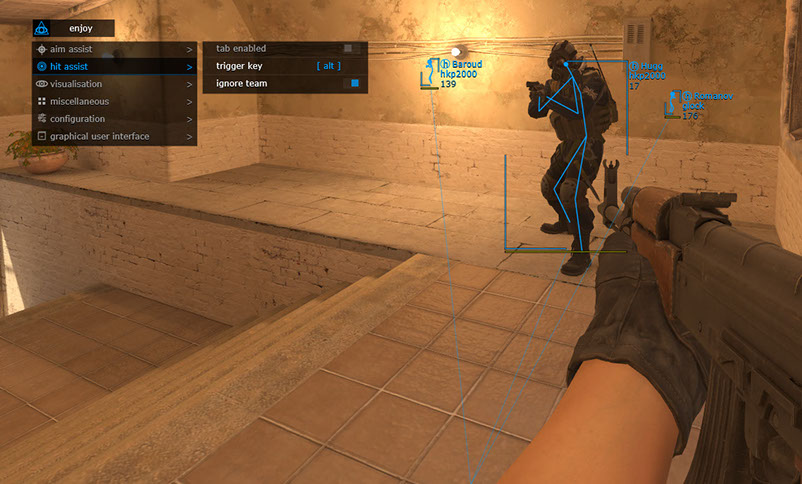
Hit Assist
- Tab enable — activate trigger bot
- Trigger key — trigger bot key binding
- Ignore team — ignore own team
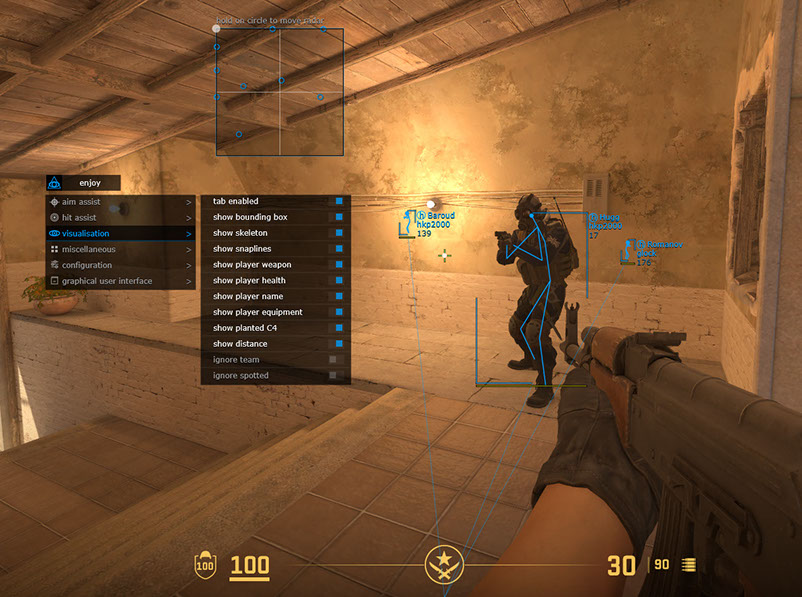
Visualisation
- Tab enable — activate visual features
- Show bounding box — 2D square on players
- Show skeleton
- Show snaplines — lines to players
- Show player weapon
- Show player health
- Show player name
- Show player equipment
- Show planted C4 — location and explosion timer
- Show distance
- Ignore team
- Ignore spotted — ignore already-visible players
Configuration
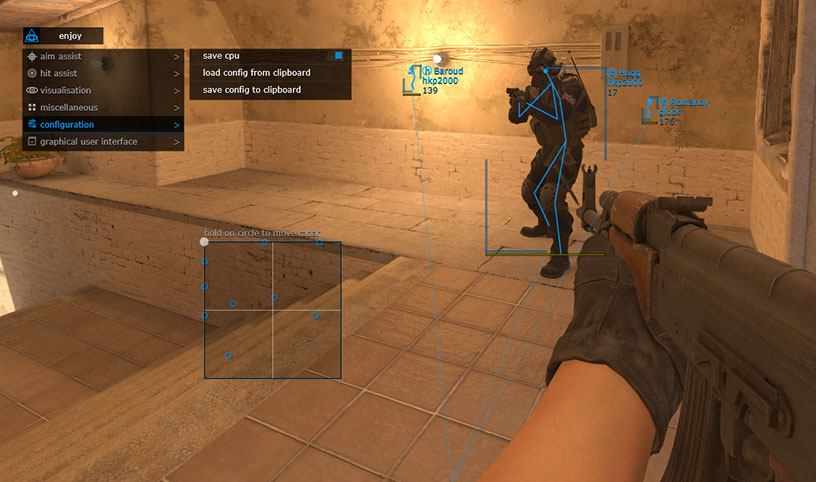
- Save CPU — reduce CPU resource usage
- Load config from clipboard
- Save config to clipboard
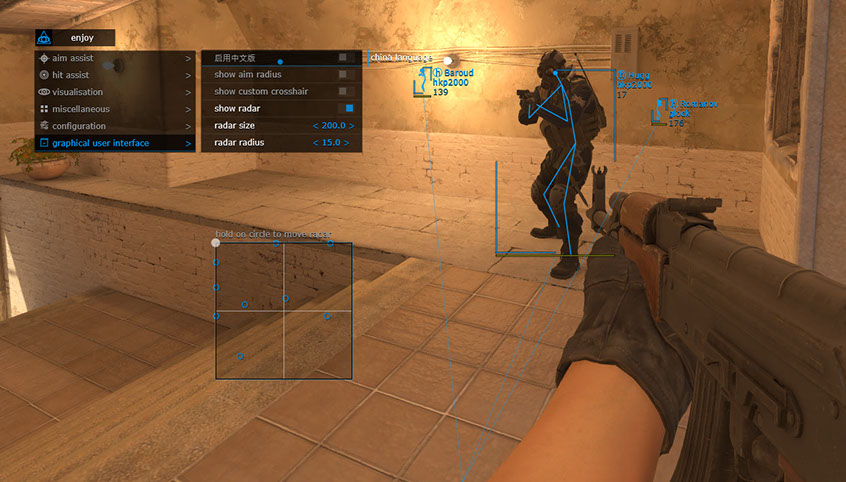
Graphical User Interface
- Menu language — English / Chinese
- Show aim radius — display the aimbot radius
- Show custom crosshair — crosshair in the center of the screen
- Show radar — draggable radar (hover + LMB)
- Radar size
- Radar radius
Note: software functionality may be changed at any time at the developer's discretion; we strive to keep the information up to date.
Support
If you have any questions about launch or configuration — contact us in Telegram or Discord, and we will help you get set up. Every product on the site has a live working status and update history, so you can check everything before buying.Useful Links
- You cant view this link please login.
- You cant view this link please login.
- You cant view this link please login.
- You cant view this link please login.
- You cant view this link please login.
- You cant view this link please login.
Contacts
Telegram (admin): @undetect
Discord:
You cant view this link please login.
Email: [email protected]
VK: vk.com/imdreamhack
Official Website
Full catalog, reviews and support — on the official website
You cant view this link please login.
Cheat Menu Screenshots
| 
|
| 
|
Frequently Asked Questions
Q: Which game version is supported? A: The Steam version of Counter-Strike 2.
Q: Which window modes are supported? A: Windowed, Fullscreen in window, and Fullscreen.
Q: Which operating systems are supported? A: Windows 10 / 11 x64, versions 2004 / 20H2 / 21H1 / 21H2 / 22H2 / 23H2.
Q: Which processors are supported? A: Intel and AMD.
Q: Which anti-cheat is covered? A: Valve Anti-Cheat (VAC).
Q: Does it have video / screenshot invisibility? A: No — the cheat is visible on recordings and screenshots.
Q: Which menu languages are available? A: English and Chinese.
Q: Does it have a Trigger Bot? A: Yes, with its own hotkey, trigger delay and team-ignore toggle.
Q: Can I save my settings? A: Yes, Load / Save config is done via the clipboard (copy / paste).
Q: Is there a custom crosshair and radar? A: Yes, both are available in the GUI section with size and radius sliders for the radar.
SEO Tags
Mason, Counter-Strike 2, CS2, Aimbot, ESP
Last edited:

