


- Status
- Offline
- Joined
- Apr 19, 2022
- Messages
- 143
- Reaction score
- 2
Stealth — Professional Cheat for Apex Legends (Aimbot, ESP, Loot, Radar)
Stealth — a reliable external cheat for Apex Legends with smooth Aimbot, full player ESP, Loot ESP, a built-in Radar and deep visual customization.
Stealth is an External project for Apex Legends, built for stable performance and comfortable gameplay. The software works outside the game process and receives regular updates for every new season. It is equally suited to calm, legit-style play and to aggressive battle sessions thanks to a dedicated Battle Mode profile you can toggle with a single hotkey.
The Aimbot is fully configurable: speed slider (1–10), artificial inaccuracy, bone priority (Head / Chest / Pelvis), working FOV and maximum distance up to 600 meters, plus a visibility check and an ignore-knocked filter. The ESP shows 2D boxes, skeletons, hitboxes, nicknames, health, current weapon and distance on players up to 1000 meters, and the Loot ESP highlights weapons, ammo, heals, equipment, grenades and attachments with a minimum-rarity filter. A built-in Radar displays players and loot with nicknames, direction arrows and distances, and every color — visible, invisible, knocked, skeleton, corpse and aimbot elements — is customizable in RGB.
Video
Prices
Choose a subscription period and proceed to checkout. Payments are processed via the official Oplata.info gateway.
| Period | Price | Checkout |
| 1 day | $5.00 |
You cant view this link please login.
|
| 7 days | $20.00 |
You cant view this link please login.
|
| 30 days | $40.00 |
You cant view this link please login.
|
You cant view this link please login.
System Requirements
- Operating system: Windows 10, 11 x64 — versions 21H1, 22H2, 23H2, 24H2, 25H2
- Processors: Intel or AMD only
- Game client: Steam
- BIOS: UEFI only
Key Features
• Smooth Aimbot with speed (1–10), FOV, bone priority, visibility check and ignore-knocked
• Artificial inaccuracy and working distance up to 600 m
• Player ESP: 2D box, nickname, health, weapon, skeleton, hitbox, distance (up to 1000 m)
• Loot ESP with rarity filter: weapons, ammo, heals, equipment, grenades, attachments
• Corpse ESP with adjustable distance
• Built-in Radar with player and loot tracking, nicknames, direction and distance
• Full RGB color customization and hitbox transparency
• Battle Mode profile with a dedicated hotkey and English / Russian interface
Full Feature List
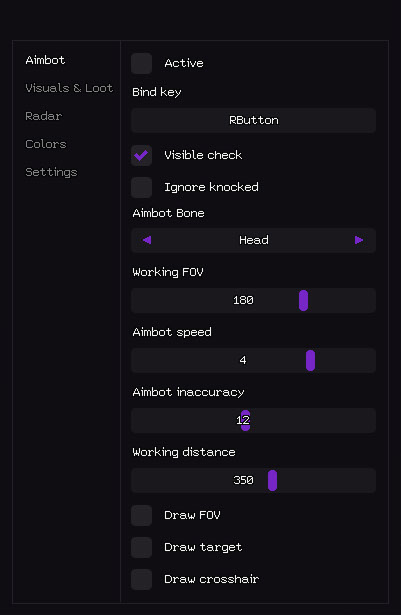
Aimbot
- Active — Enable / Disable aimbot.
- Bind key — Hotkey to toggle aimbot (can be held or toggled).
- Visible check — Aim only at visible enemies (does not shoot through walls).
- Ignore knocked — Skip downed / knocked players.
- Aimbot Bone — Target priority: Head / Chest / Pelvis.
- Working FOV — Field-of-view radius for target selection.
- Aimbot speed — Aim smoothing speed (1–10).
- Aimbot inaccuracy — Artificial spread / humanization.
- Working distance — Max aimbot range (0–600 m).
- Draw FOV — Show FOV circle on screen.
- Draw target — Highlight current locked target.
- Draw crosshair — Static custom crosshair on screen.
Players
- Box — 2D box around players.
- Name — Player nickname.
- Health — Health value or bar.
- Weapon — Current weapon name.
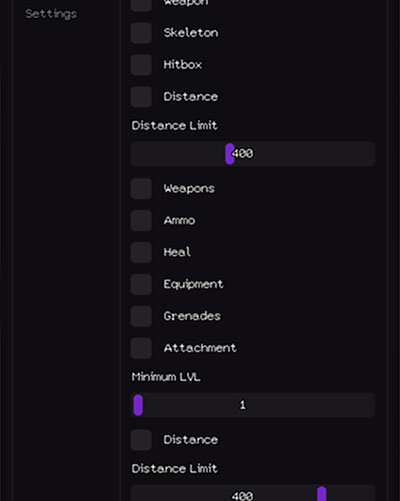
- Skeleton — Full player skeleton.
- Hitbox — Show hitbox positions.
- Distance — Distance to player.
- Distance Limit — Max render distance (0–1000 m).
Loot
- Weapons — Highlight dropped weapons.
- Ammo — Show ammunition.
- Heal — Highlight meds and healing items.
- Equipment — Armor, helmets, clothing.
- Grenades — Explosive items (grenades, arcs).
- Attachment — Weapon attachments and mods.
- Minimum LVL — Minimum rarity filter.
- Distance — Show distance to item.
- Distance Limit — Loot ESP radius (0–1000 m).
Corpses
- Corpse — Highlight dead player bodies.
- Distance — Distance to corpse.
- Distance Limit — Corpse ESP radius (0–1000 m).
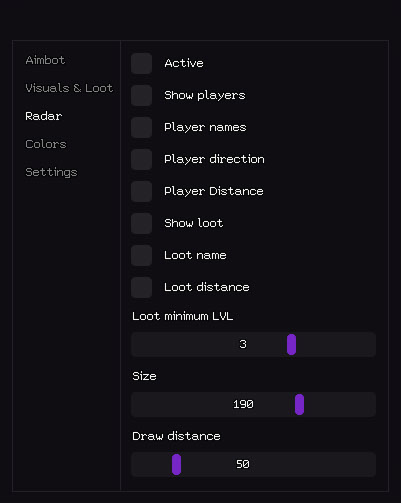
Radar
- Active — Enable radar.
- Show players — Display players on radar.
- Player names — Show nicknames on radar.
- Player direction — Show view-direction arrow.
- Player Distance — Distance to player.
- Show loot — Display loot on radar.
- Loot name — Show item name.
- Loot distance — Distance to loot.
- Loot minimum LVL — Loot rarity filter.
- Size — Radar window size (50–200 px).
- Draw distance — Radar working radius (50–400 m).
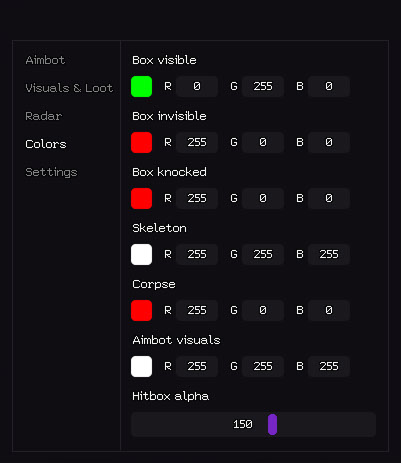
Colors
- Box visible — Color for visible players (RGB).
- Box invisible — Color for occluded players.
- Box knocked — Color for knocked players.
- Skeleton — Skeleton color.
- Corpse — Corpse highlight color.
- Aimbot visuals — FOV / crosshair / target-marker colors.
- Hitbox alpha — Hitbox transparency (0–255).
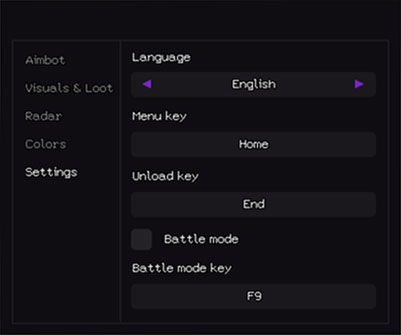
Settings
- Language — Interface: English / Russian.
- Menu key — Hotkey to open / close the menu.
- Unload key — Hotkey to completely unload the cheat.
- Battle mode — Separate aggressive-config profile (quick switch).
- Battle mode key — Hotkey to toggle Battle Mode.
Support
If you have questions before or after purchase, reach out via Telegram or Discord — our team assists with activation, configuration and troubleshooting. Current build and service status is published on the
You cant view this link please login.
.Useful Links
- You cant view this link please login.
- You cant view this link please login.
- You cant view this link please login.
- You cant view this link please login.
- You cant view this link please login.
Contacts
Telegram: @undetect
Discord:
You cant view this link please login.
Email: [email protected]
VK: vk.com/imdreamhack
Official Website
For additional information, updates and support, visit the official product page:
You cant view this link please login.
In-Game Screenshots
| 
|
| 
|
Frequently Asked Questions
Q: Is Stealth an External or Internal project? A: External — the software runs outside the game process.
Q: Which game client is supported? A: Steam.
Q: Which operating systems are supported? A: Windows 10 / 11 x64 — versions 21H1, 22H2, 23H2, 24H2, 25H2.
Q: What BIOS setting is required? A: UEFI only.
Q: Can I switch the menu language? A: Yes, the interface supports English and Russian.
Q: Can I tune the Aimbot for a calmer playstyle? A: Yes — adjust aim speed (1–10), enable artificial inaccuracy and switch bone priority between Head, Chest and Pelvis.
Q: Is there a loot filter? A: Yes — Loot ESP includes a minimum-rarity filter so only valuable items are highlighted.
Q: Does the Radar show loot too? A: Yes — the Radar displays both players and loot, with adjustable window size (50–200 px) and draw distance (50–400 m).
Q: Is there a quick way to switch between playstyles? A: Yes — a dedicated Battle Mode profile can be toggled with its own hotkey.
Q: Which game client is supported? A: Steam.
Q: Which operating systems are supported? A: Windows 10 / 11 x64 — versions 21H1, 22H2, 23H2, 24H2, 25H2.
Q: What BIOS setting is required? A: UEFI only.
Q: Can I switch the menu language? A: Yes, the interface supports English and Russian.
Q: Can I tune the Aimbot for a calmer playstyle? A: Yes — adjust aim speed (1–10), enable artificial inaccuracy and switch bone priority between Head, Chest and Pelvis.
Q: Is there a loot filter? A: Yes — Loot ESP includes a minimum-rarity filter so only valuable items are highlighted.
Q: Does the Radar show loot too? A: Yes — the Radar displays both players and loot, with adjustable window size (50–200 px) and draw distance (50–400 m).
Q: Is there a quick way to switch between playstyles? A: Yes — a dedicated Battle Mode profile can be toggled with its own hotkey.
SEO Tags
SEO Tags
Apex Legends cheat, Stealth, Aimbot, ESP, Radar,
Last edited:

