


- Status
- Offline
- Joined
- Apr 19, 2022
- Messages
- 143
- Reaction score
- 2
Melonity for Minecraft — 100+ Features across Combat, Survival, Visual & Utility
Minecraft — Melonity is a professional cheat with 100+ features split across four module categories: Combat, Survival, Visual / ESP and Utility. Compatible with FT, RW, HW, Spooky and other popular servers.
Melonity is one of the most feature-dense Minecraft cheats on the market. The Combat category covers KillAura-style modules for FT, RW, HW, Spooky and other servers, plus TriggerBot, ElytraAura, AutoCrystal, ProjectileHelper, BowSpammer, PearlTarget, AutoDodge, Hitbox expansion, Surround, AntiMiss, NoFriendDamage, Spider and ElytraRecast. Survival adds AutoGapple, AutoTotem, AutoSave, AutoRespawn, NoVelocity, NoPush, Sprint, NoSlowDown and SafeWalk for one-click survivability.
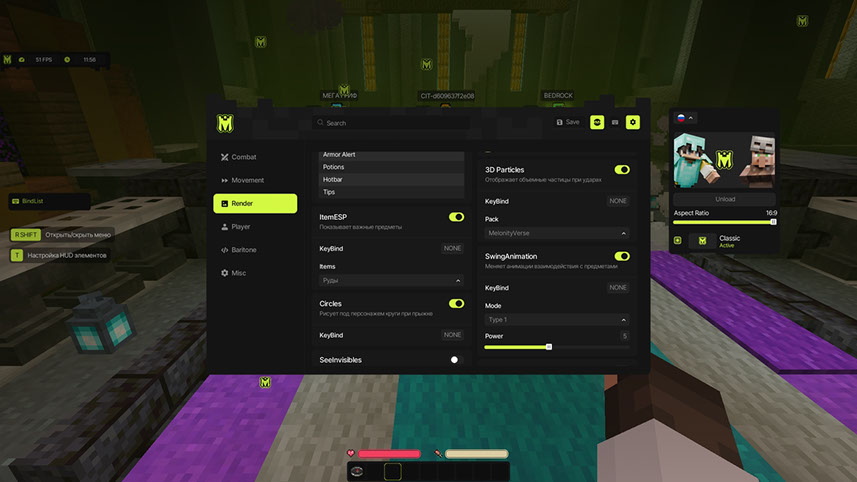
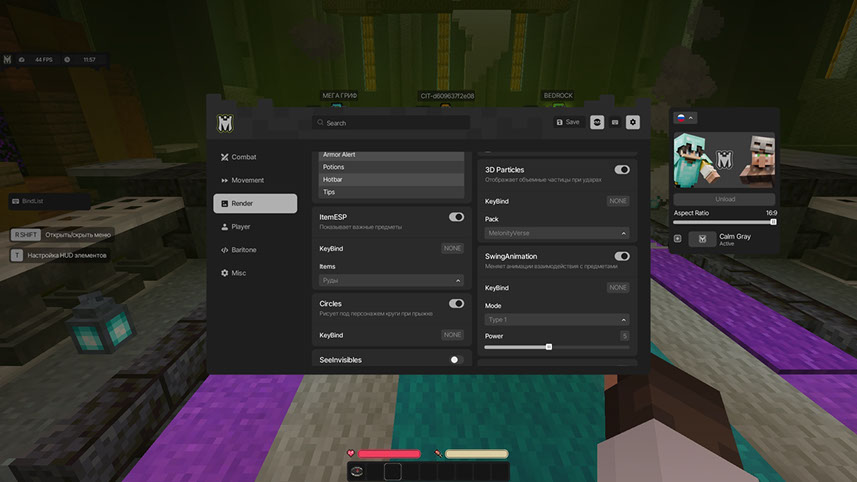
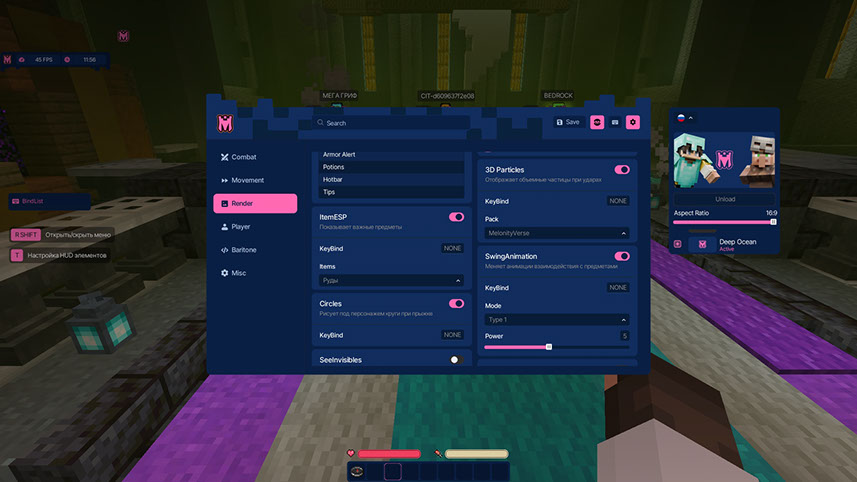
The Visual / ESP tab includes ESP with names / health / distance, ShaderESP, GlowESP, ItemESP, BlockESP for ores, AncientXRay, SeeInvisibles, Predictions, HUD, Circles, 3D Particles, Nimbus, SwingAnimation, ViewModel, WorldTime, FogColor, TNTTimer, RegionViewer, DeathCoord, NoRender and Schedules for FunTime. Utility rounds out the package with FreeCam, GuiMove, AutoTool, Nuker, AutoWindCharge, AirDropStealer, MiddleClickPearl, ItemScroller, ItemSwapFix, PotionBot, AutoBuy, AuctionHelper, CreeperFarm, ClanUpgrade, ServerAssist, AutoAccept, AutoAuth, AutoLeave, RWJoiner, NoServerRotation, NoJumpDelay, NameProtect, Nointeract, NoPlayerTrace, ToggleSound, AntiAFK and GappleTimer.
Video
Prices
Pick the subscription that fits your schedule. Payment is processed through eliteseller.ru.| Period | Price | Checkout |
| 1 month | $6 |
You cant view this link please login.
|
| 365 days | $49 |
You cant view this link please login.
|
You cant view this link please login.
System Requirements
- Operating system: Windows 10 / Windows 11
- Processor: Intel / AMD
- Game client: any launcher
- Window mode: Windowed, Frameless, Full Screen
- USB flash drive: not required
- Built-in spoofer: no
Key Features
Below is a short overview of what Melonity offers in Minecraft. The full list with every module is available in the expanded block further down.✔ Combat — KillAura, TriggerBot, ElytraAura, AutoCrystal, BowSpammer, AutoDodge, Hitbox, Surround
✔ Survival — AutoGapple, AutoTotem, AutoSave, AutoRespawn, NoVelocity, NoPush, Sprint, SafeWalk
✔ Visual / ESP — ESP, ShaderESP, GlowESP, ItemESP, BlockESP, AncientXRay, SeeInvisibles, Predictions
✔ Utility — FreeCam, Nuker, AutoTool, PotionBot, AutoBuy, AuctionHelper, AntiAFK and many more
✔ Servers — FT, RW, HW, Spooky and other popular servers
✔ Total — 100+ modules across 4 categories
Full Feature List
Combat
- TriggerBot — automatic attack when a target appears in the field of view
- ElytraAura — auto attack while flying on elytra
- AutoCrystal — automatic placement of end crystals on obsidian
- ProjectileHelper — targeting flying objects, range adjustment and visual rotation
- BowSpammer — rapid bow arrow spam
- PearlTarget — throw ender pearl at enemy's position
- AutoDodge — dodge incoming projectiles
- Hitbox — expand player hitboxes
- Surround — place cobweb under enemy to slow them down
- AntiMiss — block empty air swings
- NoFriendDamage — block damage to players on your friend list
- Spider — speed up wall climbing with water bucket
- ElytraRecast — elytra abuse for speed boost
Survival
- AutoGapple — auto-eat golden apples when health is low
- AutoTotem — automatic totem use before death
- AutoSave — auto rescue when falling
- AutoRespawn — auto respawn after death
- NoVelocity — disable knockback
- NoPush — remove push from players and items
- Sprint — automatic sprinting
- NoSlowDown — cancel slowdown from items
- SafeWalk — prevent falling off blocks
Visual / ESP
- ESP — player information (names, health, distance)
- ShaderESP — shader highlighting for players
- GlowESP — glowing outline around players
- ItemESP — display items and ores on the ground
- BlockESP — highlight ores through blocks
- AncientXRay — highlight ancient debris
- SeeInvisibles — see invisible / spectator players
- Predictions — projectile trajectory prediction
- HUD — additional interface elements
- Circles — circles under character when jumping
- 3D Particles — volumetric particles on hit
- Nimbus — halo above your head
- SwingAnimation — smooth attack animations
- ViewModel — change hand position
- WorldTime — adjust time of day
- FogColor — customize fog color
- TNTTimer — timer until TNT explosion
- RegionViewer — region radius display
- DeathCoord — death coordinates
- NoRender — remove unnecessary effects (fire, totem, chat, boss bar, thunder, potions)
- Schedules — event tracker for FunTime
Utility
- FreeCam — free camera (spectator mode)
- GuiMove — move with open inventory
- AutoTool — automatic tool switching
- Nuker — auto-mine blocks with priorities
- AutoWindCharge — automatic wind charge use
- AirDropStealer — auto-collect items from airdrops
- MiddleClickPearl — pearl on middle mouse click
- ItemScroller — quick item movement
- ItemSwapFix — item synchronization
- PotionBot — automatic potion brewing
- AutoBuy — auto-purchase items at auction
- AuctionHelper — highlight cheap lots
- CreeperFarm — auto creeper farming
- ClanUpgrade — auto clan upgrade
- ServerAssist — server items support by keybind
- AutoAccept — auto-accept teleport requests
- AutoAuth — auto login and authorization
- AutoLeave — auto leave when a player appears nearby
- RWJoiner — auto join ReallyWorld
- NoServerRotation — block server head rotation
- NoJumpDelay — disable jump delay
- NameProtect — nickname substitution
- Nointeract — block interaction with specified blocks
- NoPlayerTrace — reset hitboxes of other players
- ToggleSound — module toggle sounds
- AntiAFK — prevent AFK kick
- GappleTimer — golden apple cooldown timer
* The functionality of the program may change at the developer's discretion; we always strive to keep the information up to date.
Support
If you have any questions about launch or configuration — contact us in Telegram or Discord, and we will help you get set up. Every product on the site has a live working status and update history, so you can check everything before buying.Useful Links
- You cant view this link please login.
- You cant view this link please login.
- You cant view this link please login.
- You cant view this link please login.
- You cant view this link please login.
Contacts
Telegram (admin): @undetect
Discord:
You cant view this link please login.
Email: [email protected]
VK: vk.com/imdreamhack
Official Website
Full catalog, reviews and support — on the official website
You cant view this link please login.
In-Game Screenshots
| 
|
Frequently Asked Questions
Q: Which servers does Melonity work on? A: FT, RW, HW, Spooky and other popular servers.
Q: How many features does Melonity have? A: 100+ modules split across four categories: Combat, Survival, Visual / ESP and Utility.
Q: Which operating systems are supported? A: Windows 10 and Windows 11.
Q: Which processors are supported? A: Intel and AMD.
Q: Which launchers are supported? A: Any launcher.
Q: Which window modes are supported? A: Windowed, Frameless and Full Screen.
Q: Is a USB flash drive required? A: No.
Q: Is there a built-in spoofer? A: No.
Q: What is AuctionHelper? A: It highlights cheap lots in the server auction, useful for flipping items.
Q: What is AutoCrystal? A: It automatically places end crystals on obsidian during combat.
Q: What is ElytraAura? A: An auto-attack module that works while flying on elytra.
Q: Does Melonity include ESP? A: Yes — standard ESP (names, health, distance), plus ShaderESP, GlowESP, ItemESP, BlockESP and AncientXRay.
SEO Tags
Melonity, Minecraft, Combat, ESP, Cheat
Last edited:

